
You can easily change the password if you have access to your WordPress account.
1. Log in to the WordPress dashboard.
2. From the Dashboard menu, go to Users and click on Profile.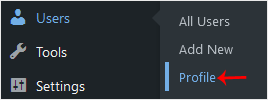
3. Scroll down to Account Management and click on Set New Password.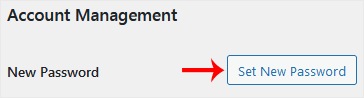
4. Copy the password to a safe place and click on Update Profile to change your password.
30-Day Money-Back Guarantee!
If you are not happy with our services for whatever reason,
we’ll refund your payment. No hassle, no risk.