
• 0 Shopping Cart
  • Account
    • Login
    • Register
    • Forgot Password?
  • Home
  • Hosting
    • cPanel Hosting
    • Direct Admin Hosting
    • Managed Wordress Hosting
    • Become Reseller
  • Servers
    • VPS Servers
    • Dedicated Servers
  • Domains
    • Domain Registration
    • Domain Transfer
  • Support
    • Submit Tickets
    • Knowledgebase
    • Announcements
    • Network Status
  • Affiliates
  • More

Knowledgebase

  1. Portal Home
  2. Knowledgebase
  3. PayPal
  4. How to Remove a Debit or Credit Card From PayPal

  Categories

Backup/Restore
4
Cloudflare (cPanel)
9
CloudLinux (cPanel)
10
cPanel - Control Panel
24
Databases
11
DirectAdmin Hosting Tutorials
48
DNS - Nameservers
6
Domain Management
10
Email
17
FTP
9
Installing a Control Panel
6
Mail Filters & SPAM
8
Mobile
11
Others
3
PayPal
7
Plesk
47
Security
10
SiteWorx (Control Panel)
58
Softaculous
69
SolusVM
18
SSL
5
Virtualizor
19
WHM
18
WordPress
17

  Categories

  Support

My Support Tickets
Announcements
Knowledgebase
Downloads
Network Status
Open Ticket

How to Remove a Debit or Credit Card From PayPal Print

  • 0


Follow this tutorial to remove your Debit or Credit Card from your PayPal account.


1. Log in to your PayPal account.


2. On top of the menu, click on Wallet.

 

3. Click on the card you want to remove from the left side.
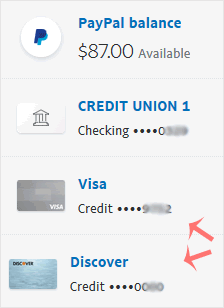
 

4. Scroll down and click on Remove Card.
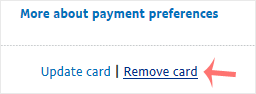
 

5. Confirm with Yes or Remove This Card.


Once removed, it will display a confirmation message.



Was this answer helpful?

Related Articles

How to Check Automatic PayPal Subscriptions   You can view the list of automatic PayPal subscriptions you have.   1. Log in to your PayPal... How to Cancel an Automatic PayPal Subscription   You can cancel pre-approved, automatic payments, or a subscription in your PayPal account.... How to Link a Debit or Credit Card to Your PayPal Account   Follow this tutorial to link your Debit or Credit Card to your PayPal Account.   1. Log in... How to Set a Preferred Payment Method in PayPal   With multiple Debit or Credit cards, you can set your proffered payment method in PayPal.... How to Subscribe to an Invoice via PayPal   You can subscribe to an invoice for recurring payments. The subscription option is only...
« Back

  Support

My Support Tickets
Announcements
Knowledgebase
Downloads
Network Status
Open Ticket

30-Day Money-Back Guarantee!

If you are not happy with our services for whatever reason,
we’ll refund your payment. No hassle, no risk.

Get Started Now
Hostiko Logo

We offer high-performance hosting for agencies, ecommerce, businesses, & side-hustlers. Unmatched speed, reliability, and 24×7 expert support.

Our Services

  • cPanel Hosting
  • DirectAdmin Hosting
  • Managed WordPress
  • Reseller Hosting

Hosterr

  • About Hosterr
  • Help Center
  • Network Status
  • News & Update

Contact Us

  • Submit A Ticket
  • Knowledge Base
  • Privacy Policy
  • Acceptable Usage Policy

Copyright © 2026 HOSTERR. All Rights Reserved.


Loading...
Loading...
Choose language
العربية
Azerbaijani
Català
中文
Hrvatski
Čeština
Dansk
Nederlands
English
Estonian
Persian
Français
Deutsch
עברית
Magyar
Italiano
Macedonian
Norwegian
Português
Português
Română
Русский
Español
Svenska
Türkçe
Українська

Choose Currency

$ USD
£ GBP
€ EUR
$ AUD
Rs PKR

Generate Password

Please enter a number between 8 and 64 for the password length