1. Open Outlook 2019.

2. In the left panel. You can see a list of your email accounts, double-click on it to expand.
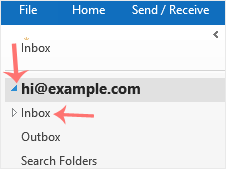
3. Click on Inbox, and it will start syncing.

1. Open Outlook 2019.
2. In the left panel. You can see a list of your email accounts, double-click on it to expand.
3. Click on Inbox, and it will start syncing.
If you are not happy with our services for whatever reason,
we’ll refund your payment. No hassle, no risk.
We offer high-performance hosting for agencies, ecommerce, businesses, & side-hustlers. Unmatched speed, reliability, and 24×7 expert support.